Baby Spider: A Sweet Handwritten Font for Modern Web Design
In the world of digital design, typography is rarely just about readability; it is about voice. As a web designer who spends hours tweaking kerning and adjusting line heights, I have learned that the right typeface can transform a sterile layout into an inviting experience. This is where Baby Spider, a sweet and friendly handwritten font, truly shines. It is not merely a decorative element but a strategic tool that brings personality to brand-focused web experiences without sacrificing clarity.
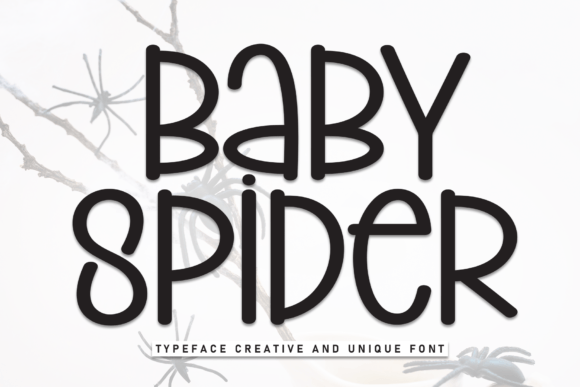
Baby Spider belongs to the Script Handwritten category, yet it avoids the chaotic energy often associated with casual brush scripts. Its natural and unique style makes it incredibly fitting for a large pool of designs, particularly those aiming for warmth, approachability, and authenticity. Whether you are building a landing page for a boutique online store or crafting a personal portfolio, the only limit is your imagination. However, using a creative font effectively requires understanding its specific strengths in visual hierarchy and user engagement.
Defining the Personality of Baby Spider
When we talk about a handwritten font like Baby Spider, we are discussing a typeface that mimics the organic imperfections of human penmanship. But unlike aggressive graffiti styles or overly complex calligraphy, Baby Spider maintains a clean, legible structure. The strokes are soft, the connections between letters are fluid, and the overall weight is balanced enough to hold attention without overwhelming the eye.
This balance is crucial for web design. In a digital environment, users scan content rapidly. A display font that is too intricate can cause cognitive load, forcing readers to pause and decode the text. Baby Spider strikes a rare equilibrium: it feels personal and crafted, yet it remains instantly recognizable. This makes it an excellent choice for establishing a brand tone that values creativity and human connection over corporate rigidity. It signals to the visitor that the brand behind the screen is approachable, trustworthy, and detail-oriented.
Strategic Placement for Maximum Impact
One of the most common mistakes designers make with script fonts is using them everywhere. To leverage Baby Spider effectively, you must be selective about where it appears in your layout. Because of its distinct character, it performs best as a display font rather than body copy. Here is how I recommend integrating it into various digital assets:
- Hero Sections and Headers: Use Baby Spider for main headlines on landing pages. The handwritten style creates an immediate emotional hook, drawing the user in before they even read the subheading. For example, a coaching website might use Baby Spider for "Find Your Balance" while keeping the explanatory text in a neutral sans serif font.
- Call-to-Action (CTA) Accents: While you should avoid putting full buttons in this font, using Baby Spider for short phrases within CTA areas can boost click-through rates. Imagine a button that says "Start Your Journey" where "Journey" is rendered in Baby Spider. It adds a touch of whimsy that encourages interaction.
- Blog Graphics and Social Media Assets: For SaaS founders and marketers creating social media graphics or blog headers, Baby Spider provides instant brand recognition. It stands out in crowded feeds because it breaks the monotony of standard geometric sans serifs.
- E-commerce Banners: Online store owners can use this font for seasonal sales banners or product highlights. The sweet aesthetic aligns well with lifestyle brands, handmade goods, or children’s products, reinforcing the premium nature of the items through thoughtful typography.
Readability and Mobile Responsiveness
Digital typography must work across devices. A font that looks stunning on a 4K monitor might become illegible on a small smartphone screen. When implementing Baby Spider, consider the constraints of responsive layouts. On mobile screens, especially when text is overlaid on images or placed against busy backgrounds, smaller sizes can blur the distinctive features of the handwriting.
To maintain readability, ensure you are using sufficient contrast. Baby Spider works beautifully on light backgrounds, where its dark ink-like strokes pop clearly. On dark backgrounds, you may need to adjust the color weight slightly to prevent the thin lines from disappearing. Furthermore, always test your font pairing at various breakpoints. If the headline shrinks too much on mobile, the handwritten details may get lost. In such cases, consider switching to a simpler sans serif font for very small viewports to preserve usability.
The Art of Font Pairing
No font exists in isolation. To create a professional and modern typography system, Baby Spider needs a reliable partner. Since Baby Spider carries significant visual weight and personality, it pairs exceptionally well with simple, clean typefaces that provide stability.
A classic combination is pairing Baby Spider with a geometric sans serif font for body copy. The sans serif provides a neutral canvas that allows the handwritten header to take center stage without competing for attention. This contrast creates a clear visual hierarchy, guiding the user’s eye from the engaging headline down to the informative text. Alternatively, for a more editorial digital identity, you might pair it with a traditional serif font. This combination evokes a sense of heritage and sophistication, perfect for luxury brands or creative agencies looking to blend tradition with modern creativity.
Technical Considerations for Web Implementation
Before downloading any premium font, it is essential to review the technical specifications. Check if the package includes multiple weights and styles. While Baby Spider is primarily a display font, having italic variants or alternate characters can add depth to your design. Ensure the file formats include WOFF2 for optimal web performance, as loading times directly impact user experience and SEO rankings.
Additionally, verify multilingual support if your target audience is global. Some handwritten fonts lack extended character sets, which can lead to missing glyphs when displaying special characters or non-Latin alphabets. Finally, always adhere to commercial font licensing agreements. Using Baby Spider in client projects, online stores, or digital templates requires the appropriate license to avoid legal issues. Proper licensing protects your business and respects the creator’s intellectual property, ensuring a sustainable ecosystem for design assets.
Building a Consistent Brand Identity
Consistency is key to building trust. By incorporating Baby Spider into your brand identity guidelines, you ensure that every touchpoint—from email newsletters to app screens—feels cohesive. When used strategically, this font does more than decorate; it communicates values. It tells your audience that you care about the details, that you value creativity, and that you are here to connect with them on a human level. In a digital landscape often dominated by cold, algorithmic interfaces, Baby Spider offers a refreshing reminder of the human hand behind the code.